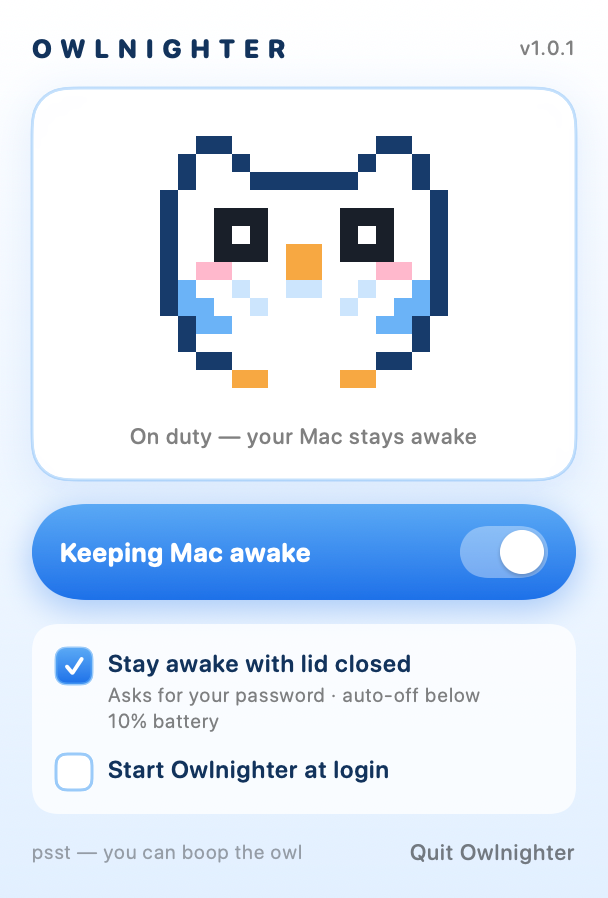
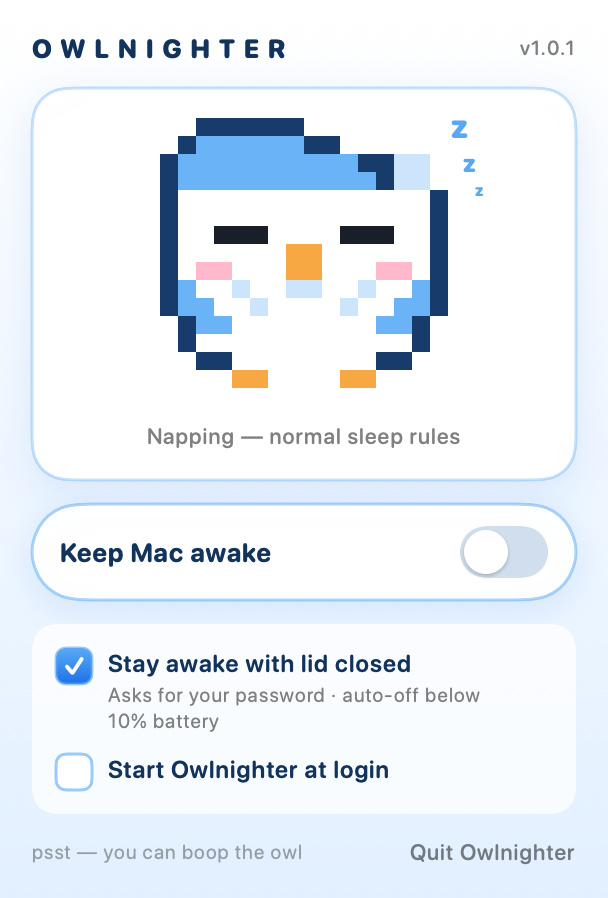
He blinks. You can boop him. He takes his job very seriously.
How it works
Three steps. Zero rituals.
1
Perch
Owlnighter lives quietly in your menu bar. Awake owl means on duty; nightcap owl means everything's back to normal.
2
Hoot
Flip the big blue switch. Check “Stay awake with lid closed” for full clamshell power — macOS asks for your password once per toggle.
3
Slam the lid
Music keeps playing. SSH stays connected. The 40 GB download finishes. Your Mac hums along like the lid never closed.
Features
Small owl. Serious job.
Everything you need to keep a Mac awake, and nothing you don't.
⚡️
One-click all-nighter
One switch keeps your Mac and display awake. Flip it back and normal sleep rules return instantly.
💻
True lid-closed mode
Plain caffeinate apps give up the moment the lid closes. Owlnighter uses macOS's system sleep override so your Mac genuinely keeps running, clamshell and all.
🔋
Battery bodyguard
Running on battery and dip below 10%? Owlnighter tucks your Mac back in automatically instead of draining it flat in a bag.
🪶
Featherweight
Native Swift, ~0.5 MB, no Electron, no background junk, no login screens. It sips resources while it guards yours.
😴
A pet with feelings
Wide sparkly eyes on duty, a nightcap and “z z z” off duty. He blinks every few seconds and hoots when you boop him.
🔒
Nothing leaves your Mac
Zero network calls, zero analytics, zero update nags. Owlnighter couldn't phone home if he wanted to — there's no home to phone.
Screenshots
Straight from the nest.
Rendered from the actual app — this is exactly what you get.
Owlnighter
2:37 AM
On duty Keep-awake on, lid-closed mode armed, eyes wide open.
Owlnighter
9:12 PM
Off duty Nightcap on, normal sleep rules, dreaming of field mice.
Download
Adopt your owl.
v1.0.1macOS 13+Universal — Apple silicon & Intel~0.5 MBFree
Install with one command — no zip, no scary dialogs:
Zip route on recent macOS (Owlnighter is a small indie app, not notarized by Apple, so macOS warns once):
Unzip, drag Owlnighter.app into Applications, open it.
macOS shows “Not Opened — Apple could not verify…”. Click Done (not Move to Bin!).
Open System Settings → Privacy & Security, scroll down, click Open Anyway, confirm.
Look up. There's an owl in your menu bar now. 🎉
Why does macOS say it “could not verify” the zip?
Apple only skips that warning for apps whose developers pay for its notarization program ($99/year) — it's not a malware verdict, just “this indie didn't pay Apple”. Files fetched with curl don't get the browser's quarantine flag, which is why the one-command install (the same trick Homebrew uses) starts cleanly. The app is identical either way — and it builds from source (below) if you'd rather trust your own compiler.
Why does lid-closed mode ask for my password?
Blocking clamshell sleep requires macOS's system-wide sleep override (pmset disablesleep), and macOS only lets administrators touch it. Owlnighter asks when you turn it on, and puts everything back when you turn it off or quit. No helpers, no daemons left behind.
Will it cook my MacBook in a backpack?
Owlnighter auto-disables below 10% battery, and macOS's own thermal protections always stay active. Still: a closed running laptop makes heat — give it some breathing room, not a sealed bag.
How do I uninstall?
Quit Owlnighter (it restores normal sleep on the way out) and drag the app to the Trash. If you ever force-quit with lid mode on, run sudo pmset -a disablesleep 0 once — Owlnighter also warns you about this itself.
Prefer compiling your own owl?
cd app && ./build.sh # needs Xcode Command Line Tools → build/Owlnighter.app
Changelog
Owl history.
v1.0.1
Silent flight 🪶
One-command install — curl -fsSL https://owlnighter.notcool.in/install.sh | bash. No zip, no “could not verify” dialog. Like an owl, it arrives without a sound.
Zip download instructions updated for the newest macOS Gatekeeper flow (Settings → Privacy & Security → Open Anyway).
v1.0.0
Hatch day 🐣
Pixel owl menu bar app — awake owl on duty, nightcap owl off duty.
One-switch keep-awake for system, display, and idle sleep.
Lid-closed mode — keeps your Mac fully running in clamshell via the macOS sleep override. Asks for an admin password; restores normal sleep on toggle-off and on quit.
Battery bodyguard — automatically stands down below 10% on battery.
Stale-override detection — warns (with the fix) if a force-quit ever left system sleep disabled.